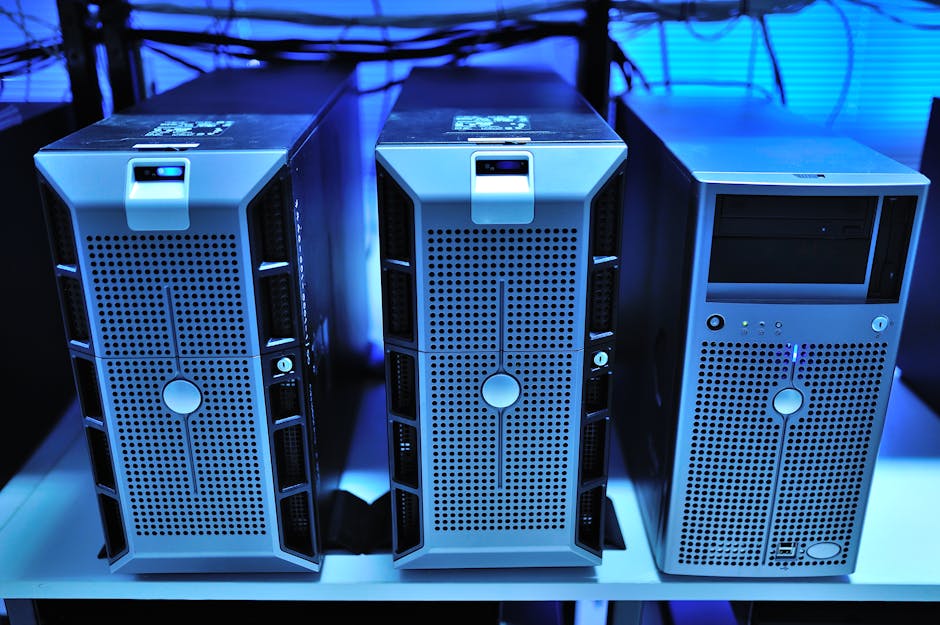
A colleague of mine — senior infrastructure engineer, been in the game for 15 years — texted me a photo last month. It was his garage. Floor to ceiling, three 12U open-frame racks, blinking amber and green like a Vegas slot machine. “Total spend: $680,” he wrote. My jaw dropped. He’d snagged three decommissioned Dell PowerEdge R730s from a local data center liquidation, slapped in some extra RAM, and built himself a Kubernetes cluster that would make some startups jealous. That conversation is exactly why I’m writing this. In 2026, the used server market has exploded with an absolutely wild selection of enterprise-grade hardware, and if you know what to look for, you can build a home lab that rivals professional setups for a fraction of the price.
Why 2026 Is Actually the Best Year Yet to Buy Used Servers
Here’s the thing a lot of people miss: the hardware depreciation cycle is your best friend. Enterprise data centers typically refresh their hardware on 3–5 year cycles. That means servers that were cutting-edge in 2021–2022 — think dual-socket Xeon Scalable (Ice Lake/Cascade Lake), NVMe-capable storage backplanes, 25GbE onboard NICs — are flooding the secondary market right now in 2026. According to IDC’s Q1 2026 Server Market report, approximately 2.3 million rack servers were decommissioned globally in 2025 alone, creating a secondary supply glut that’s pushed prices to 10–25 cents on the dollar compared to original MSRP.
The sweet spot hardware right now? Anything from the 2020–2022 generation:
- Dell PowerEdge R730/R740: Workhorses. Dual LGA2011/LGA3647 sockets, up to 3TB RAM support on R740, 24 DIMM slots, PCIe Gen3 expansion. Street price in 2026: $150–$350 depending on config.
- HPE ProLiant DL380 Gen10: Rock-solid ILO management, excellent driver support, great for VMware/Proxmox deployments. Pick these up for $200–$450.
- Supermicro X11 Series: Budget king. Bare-bones options available under $100 sometimes. IPMI is natively supported, great for DIY builders who want to pick their own CPUs.
- Lenovo ThinkSystem SR650: Often overlooked but extremely well-built, excellent XClarity controller for remote management. Pricing is aggressive in 2026 — around $200–$400.
- Cisco UCS C240 M5: 24 SFF drive bays, dual CPU, enterprise storage backbone. Perfect if you’re building a NAS/SAN hybrid. Budget $300–$600.
The “Power Bill Problem” — This Is Where Most People Go Wrong
I cannot stress this enough: TDP is not the only number that matters. Idle power consumption is what’s going to haunt your electricity bill every month. A dual-socket R730 with two E5-2680v4 CPUs at full load draws around 350–400W. But at idle — which is 90% of home lab runtime — it’s still pulling 120–160W. Over a year, that’s about 1,051–1,401 kWh. At the US average residential rate of $0.168/kWh in 2026 (EIA data, Q1 2026), you’re looking at $177–$235 per year, per server, just in electricity. Two servers = potentially $400+ annually. Factor this into your “budget build” calculation.
The pro move? Look for servers with C-State support enabled and modern Xeon D or Intel Xeon Scalable 3rd/4th gen CPUs that have much better idle efficiency. Alternatively, consider mixing in one or two smaller edge nodes — a used Supermicro E300-9D with an Xeon D-2100 series CPU idles at under 20W, perfect for always-on services like DNS, VPN, and monitoring.
Where to Actually Buy: Platforms That Don’t Waste Your Time
This is the research I’ve done across multiple purchases over the past two years, and the community consensus in 2026 is pretty well-established:
- eBay: Still king for selection. Use “sold listings” filter to verify fair pricing before bidding. Stick to sellers with 98%+ feedback and look for listings that include photos of POST screens — that’s a green flag for honest sellers.
- ServerMonkey / Goedeker’s Business: US-based refurbishers with warranties (typically 30–90 days). Slightly higher prices but peace of mind for first-time buyers.
- r/homelabsales on Reddit: Community-driven, often dramatically cheaper than eBay because people are just offloading surplus. No protection though — buyer beware.
- Craigslist / Facebook Marketplace: Local liquidations are gold. No shipping risk, can physically inspect hardware before paying. Set an alert for “server,” “rack server,” “data center,” and “UPS” in your area.
- Bargainhardware.com / TechLiquidators.com: Aggregators and liquidators. Worth bookmarking for bulk deals — they often list pallets from corporate IT refreshes.
Software Stack: What’s Actually Worth Running in 2026
The home lab software ecosystem has matured beautifully. Here’s the stack I’d recommend for a general-purpose lab:
- Proxmox VE 8.x: Still the community favorite for bare-metal hypervisor. Free, open-source, excellent KVM + LXC support. The Ceph integration is smooth for multi-node clusters.
- TrueNAS SCALE 25.x: The 2025 release solidified its position as the go-to for NAS/storage nodes. ZFS native, excellent Docker/app ecosystem.
- Talos Linux + k3s: Lightweight Kubernetes on immutable OS. Crazy good for home k8s clusters without the overhead of full K8s.
- Netbox (v4.x): Document your lab! IP management, rack diagrams, cable tracking. Once you’re past 3 nodes, you’ll thank yourself for implementing this.
- Grafana + Prometheus + Loki stack: Monitoring trifecta. Run it on your smallest node — it handles surprisingly heavy workloads on modest hardware.
The Noise Factor: Don’t Ignore the WAF (Wife Acceptance Factor)
I’ve made this mistake personally. A rack-mounted 1U server in an apartment at 11 PM sounds like a hair dryer strapped to a jet engine. Enterprise servers are built for data centers with proper cooling infrastructure — not bedrooms or home offices. The fans on an R720 can hit 75–80 dB at full spin-up (POST stage). Solutions in 2026 include:
- Fan speed modding via iDRAC/ILO: Dell’s iDRAC 7/8 allows third-party PCIe fan speed overrides — look up the community fan control scripts on GitHub (search “dell idrac fan control 2026”).
- Noctua fan replacements: Possible on some Supermicro chassis with standard 80mm/40mm fans. Cuts noise dramatically at idle.
- Basement/closet placement with proper ventilation: A 6-inch exhaust duct fan from Home Depot + a closet = your own mini data center room.
- Tower-to-rack conversion logic: If noise is a dealbreaker, consider tower-form workstations like used HP Z8 G4 or Dell Precision 7920 — nearly silent and nearly as capable.
Networking: The Underrated Backbone of Any Serious Lab
Your servers are only as good as the network connecting them. The good news? Enterprise networking gear has followed the same depreciation curve. In 2026, you can build a 10GbE switching fabric for under $200:
- Mikrotik CRS326-24G-2S+RM: 2x SFP+ 10GbE uplinks, 24x 1GbE, ~$179 new. Outstanding value.
- Ubiquiti USW-Pro-24-POE (used): 10GbE uplinks, PoE for access points/cameras. Find used for $250–$320.
- Used Cisco Catalyst 3850/3650: Enterprise-grade layer 3 switching with OSPF/BGP support if you want real networking lab experience. Pick up for $80–$150 on eBay.
Pair with 10GbE SFP+ DAC cables (Direct Attach Copper) — under $10 each on Amazon — and you’ve got a blazing fast inter-server fabric at near-zero cost.
Real-World Case Studies from the Community
The r/homelab subreddit and ServeTheHome forums are invaluable in 2026. Patrick Kennedy from ServeTheHome.com published a comprehensive buyer’s guide in early 2026 specifically addressing the Gen 10 HPE and Gen 14 Dell used market flood. His analysis showed that HPE Gen10 servers offer the best price/performance for Proxmox Ceph clusters specifically because of their memory bandwidth characteristics with DDR4 RDIMM in 2DPC configurations.
On the community side, a German hobbyist documented building a 4-node Proxmox HA cluster using four R730xd units for under €1,200 total (including networking and UPS), running 200+ VMs and LXC containers — essentially a private cloud. The thread got over 3,000 upvotes and the full parts list/config is publicly available on the ServeTheHome forum under the “project logs” section. Worth reading before your first purchase.
Pre-Purchase Checklist: Don’t Skip This
- Verify iDRAC/ILO/IPMI access is working (ask for a screenshot or video)
- Check POST screen for memory errors — any DIMM errors are a red flag
- Confirm hard drive bays populate correctly in management UI
- Ask for hard drive SMART data if drives are included
- Verify no “service tag” locks or BIOS passwords
- Check PSU count — dual redundant is worth paying extra for lab stability
- Confirm PCIe slot availability if you plan GPU/NIC expansion
- Calculate full loaded power draw vs. your circuit amperage (a 15A/120V circuit handles ~1,800W max — don’t push past 80% = 1,440W)
Budget Planning: Three Realistic Home Lab Tiers for 2026
Tier 1 — The Curious Beginner ($200–$400 total): Single R730 or DL380 Gen9, 64–128GB RAM, a used managed switch (Cisco SG300), running Proxmox with a handful of VMs. Perfect for learning virtualization and basic networking.
Tier 2 — The Serious Hobbyist ($600–$1,200 total): Two or three nodes (R730xd or DL360 Gen10), 10GbE networking via Mikrotik, Ceph or NFS shared storage, full Proxmox cluster. Simulate real enterprise scenarios, CI/CD pipelines, Kubernetes.
Tier 3 — The Professional Playground ($1,500–$3,000 total): Four+ node cluster, 25GbE or higher networking, dedicated TrueNAS storage node, UPS protection, full monitoring stack, possibly GPU node for ML workloads. At this level, your home lab legitimately rivals small business infrastructure.
The conclusion I keep arriving at, after years of building and rebuilding my own lab and watching dozens of others do the same: start smaller than you think you need, because you will always expand. I’ve seen people burn $2,000 on a maxed-out build only to realize they actually needed two smaller, more efficient nodes. Modularity beats monolithic every single time in a home lab context.
If rack servers genuinely aren’t feasible — noise, space, power budget — don’t force it. Used mini PCs like the Beelink EQ12 Pro clusters or Intel NUC 13/14 Pro units in 2026 run surprisingly capable multi-node setups at 8–15W idle per node. Not the same, but absolutely a valid path into the hobby.
Editor’s Comment : The used server market in 2026 is genuinely one of the best-kept secrets in the tech hobby world. The hardware is proven, the community knowledge base is enormous, and the cost savings are real — but only if you do your homework before clicking “Buy It Now.” Run the power cost math, factor in noise mitigation, and always, always verify remote management access before the money changes hands. Build incrementally, document everything in Netbox from day one, and enjoy the ride — there’s nothing quite like the satisfaction of watching your own multi-node cluster come alive for the first time.
📚 관련된 다른 글도 읽어 보세요
- 바이오 3D 프린팅 인공장기 연구 2026 최신 동향 — 진짜 장기 이식의 시대가 오고 있을까?
- Proxmox Home Server Virtualization Setup Tutorial 2026: Build Your Own Powerhouse Lab on a Budget
- 공식 문서에 속지 마라: 2026년 홈랩 서버 구축 완전 가이드 – 실제 비용·부품·삽질 기록 총정리
태그: home lab setup 2026, used server buying guide, Proxmox home lab, Dell PowerEdge homelab, HPE ProLiant used server, 10GbE home networking, budget server lab
Leave a Reply