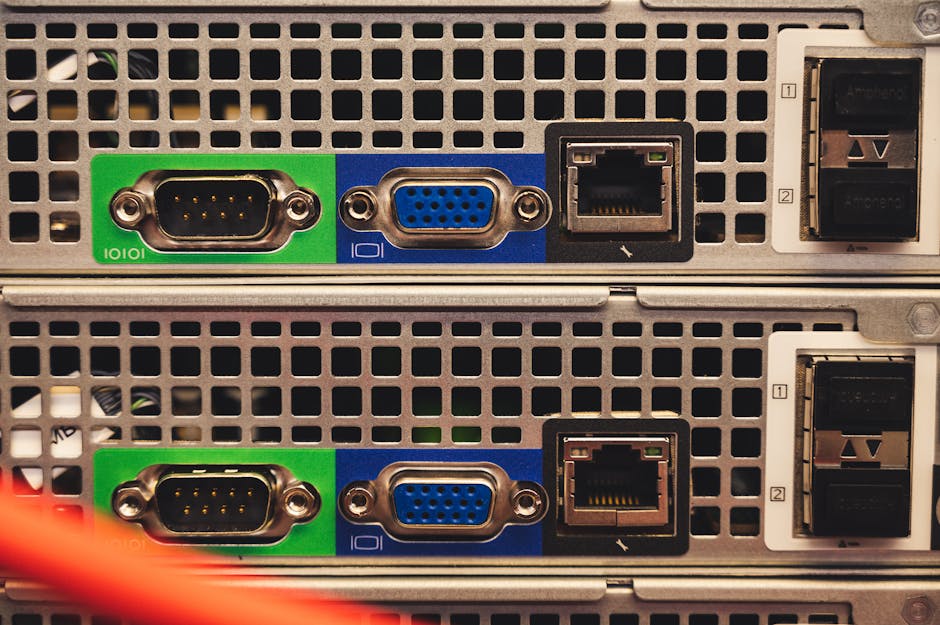
A few years ago, a friend of mine — a software engineer living in a modest apartment — showed me a rack-mounted Dell PowerEdge humming quietly in his hallway closet. He’d picked it up for under $80 on eBay. On it, he was running a full Kubernetes cluster, a Plex media server, a VPN, and a self-hosted Nextcloud instance. I was floored. That moment sent me down a rabbit hole that fundamentally changed how I think about home infrastructure. If you’ve ever felt the pull of building your own home lab but thought it was too expensive or too complicated — this guide is for you.
In 2026, the used server market has never been more accessible. Enterprise data centers are cycling through hardware at a faster pace than ever, and what gets decommissioned often still has years of useful life left in it. Let’s think through this together — what to buy, what to avoid, and how to make it work for your actual situation.
Why Home Labs Are Booming in 2026
The home lab community has exploded, and for good reason. Cloud costs have continued to climb — AWS, Azure, and GCP have seen consistent price increases since 2023. For developers, students, and IT professionals who need to test, learn, or self-host services, paying recurring cloud bills just doesn’t make sense long-term. A one-time hardware investment that pays itself off in 6–12 months is simply smarter math.
Additionally, privacy-conscious consumers are increasingly self-hosting services like email (Mailcow), password managers (Vaultwarden), and file sync (Nextcloud) rather than trusting third-party providers. A used server is the backbone of all of this.
Understanding the Used Server Market: Key Specs to Know
Before you dive into eBay, ServerMonkey, or your local Facebook Marketplace, you need to understand a few key hardware generations and what they mean for your wallet and your electricity bill.
- Dell PowerEdge R710 / R720: These are the “golden oldies” of the home lab world. Cheap (often $50–$150), plentiful, and well-documented. However, they use older Xeon processors (Westmere/Sandy Bridge era) and can draw 200–400W under load. In 2026, electricity costs make these less economical unless you’re in a low-rate region.
- Dell PowerEdge R730 / R740: The sweet spot right now. Broadwell and Skylake Xeons, better memory bandwidth, NVMe support on R740, and significantly better power efficiency. Prices range from $150–$400 depending on configuration.
- HPE ProLiant DL380 Gen9 / Gen10: HPE’s equivalent lineup. Excellent reliability, great iLO (Integrated Lights-Out) remote management. Gen10 units are hitting the used market in large numbers in 2026 as enterprises upgrade to Gen11.
- Lenovo ThinkSystem SR630 / SR650: Newer entrants to the used market. Excellent performance-per-watt ratio. Look for these if you want something from the 2018–2021 era at a reasonable price.
- Supermicro X10/X11 platforms: Popular with the DIY crowd. Modular, flexible, and often sold as bare-bones boards you can populate yourself. Steeper learning curve but maximum customization.
Real-World Cost Analysis: What Does a Home Lab Actually Cost in 2026?
Let’s run the numbers honestly, because this is where many guides let you down. Here’s a realistic breakdown for a mid-range home lab built around a used Dell R740:
- Dell PowerEdge R740 (2x Xeon Gold 6130, 128GB RAM): ~$320–$450 used
- Additional RAM upgrade to 256GB: ~$80–$120 (DDR4 ECC RDIMMs are very affordable now)
- Storage (4x 2TB SAS drives): ~$60–$100 used
- NVMe SSD for OS/cache: ~$40–$70 new
- Network switch (used Cisco SG300 or UniFi): ~$40–$80
- Total hardware investment: ~$540–$820
Now for the operational cost: an R740 idles around 80–120W. At the US average electricity rate of approximately $0.17/kWh in early 2026, that’s roughly $10–$17/month at idle. Compare that to a modest VPS rental of $40–$80/month for equivalent compute resources. Your break-even point is around 8–12 months. After that, it’s essentially free computing.
Global and Domestic Examples: How People Are Actually Using This
In South Korea, where this topic (중고 서버 홈랩) has a passionate community on platforms like CLIEN and PPomppu, hobbyists frequently build home labs for NAS alternatives, running Proxmox VE for virtualization, and setting up private gaming servers. The Korean market benefits from affordable bulk server liquidations from major tech companies headquartered in the Seoul metro area.
In Germany, where data privacy regulations (GDPR) are strictly enforced and cloud skepticism runs high, self-hosting has become almost a cultural value among tech-savvy users. Communities like the German-language r/homelab equivalent regularly feature builds based on HP and Fujitsu enterprise hardware liquidated from German banks and insurance companies.
In the United States, platforms like ServerMonkey, Labgopher (which aggregates eBay listings), and local data center liquidation auctions (search “data center liquidation auction [your city] 2026”) are goldmines. Many US homelabbers also tap into the /r/homelab subreddit’s weekly “What did you get” thread to gauge fair market prices before buying.
What to Watch Out For: Common Pitfalls for First-Time Buyers
- No iDRAC/iLO license: Remote management is essential for headless operation. Make sure the enterprise license is included or budget $10–$20 for a used license key.
- Missing rails or bezel: Not critical, but rack mounting without proper rails is a safety hazard. Confirm what’s included.
- Proprietary SAS backplanes: Some configs require specific drive sizes or connector types. Check before buying drives separately.
- Fan noise: Enterprise servers are NOT quiet. An R710 at full spin sounds like a jet engine. If you live in an apartment, consider acoustically damping the space or opting for quieter workstation-class alternatives.
- Firmware and driver compatibility: Older servers may struggle with very new operating systems. Check community forums (ServeTheHome is gold) before committing.
Realistic Alternatives: When a Full Server Might Not Be Right for You
Here’s where I want to be genuinely honest with you — a full rack-mounted server isn’t for everyone, and that’s completely okay. Let’s think through some alternatives based on your situation:
- If noise and heat are your main concerns: Look at used workstations like the HP Z440 or Dell Precision T7910. Similar Xeon power in a quieter, desktop form factor. Slightly less expandable but far more apartment-friendly.
- If you’re just starting out: A used Intel NUC (10th or 11th gen) or a mini PC like the Beelink SER series gives you a taste of home labbing without the commitment. Great for running Proxmox with a couple of VMs.
- If power efficiency is critical: ARM-based mini servers like the Raspberry Pi 5 cluster or the newer Orange Pi 5 Max are extremely low power (~5–15W per node) and surprisingly capable for lightweight workloads.
- If you want storage above all else: A used Synology or QNAP NAS (4-bay or 8-bay) paired with a separate compute unit might be cleaner than trying to do everything on one noisy server.
The key insight is this: match the hardware to your actual workload and living situation, not to what looks impressive in a Reddit post. A $60 mini PC that runs 24/7 and doesn’t annoy your partner is worth infinitely more than a $400 server that sits unplugged in a corner.
If you do go the full server route, start with Proxmox VE as your hypervisor — it’s free, powerful, and has an incredibly active community in 2026. Pair it with TrueNAS Scale for storage, and you’ll have a professional-grade setup that rivals what many small businesses pay thousands for.
The used server market in 2026 is genuinely one of the best-kept secrets in the tech enthusiast world. With a bit of research, patience, and honest self-assessment of your needs, you can build something remarkable for very little money. The community is welcoming, the documentation is rich, and the satisfaction of running your own infrastructure is hard to describe until you’ve experienced it.
Editor’s Comment : I’ve helped a few readers walk through their first server purchases over the past year, and the single most common mistake I see is overbying — grabbing a 2U beast when a small form-factor machine would have done the job better. Before you spend anything, write down your top three use cases. Everything else follows from that. Start small, experiment freely, and scale when you genuinely need to. Your future self — the one with a fully self-hosted digital life — will thank you.
태그: [‘used server home lab’, ‘homelab 2026’, ‘Proxmox VE setup’, ‘Dell PowerEdge used’, ‘self-hosted server guide’, ‘중고 서버 홈랩’, ‘home server build guide’]
Leave a Reply