A few months ago, a friend of mine — let’s call him Dave — spent three weekends building a home server from scratch. Old tower PC, a stack of salvaged hard drives, and enough cable ties to rival a data center. He was proud of it. Then his electricity bill arrived. Suddenly, the “free” server wasn’t so free anymore. Meanwhile, his neighbor had picked up a compact mini PC, plugged it in, and had Plex, Pi-hole, and a NAS running by Sunday afternoon. Same goal, wildly different journeys.
That story pretty much sums up the mini PC vs. DIY home server debate in 2026 — and honestly, neither side is wrong. But one side is almost certainly right for you specifically. Let’s think this through together.
What Are We Actually Comparing?
Before we dive into specs and prices, let’s define our terms clearly so we’re on the same page:
- Mini PC (Pre-built compact): Think Intel NUC successors, Beelink SER series, MINISFORUM UM series, or the increasingly popular GMKtec NucBox line. These are palm-sized machines that come fully assembled, draw 10–35W idle, and can run 24/7 without much worry.
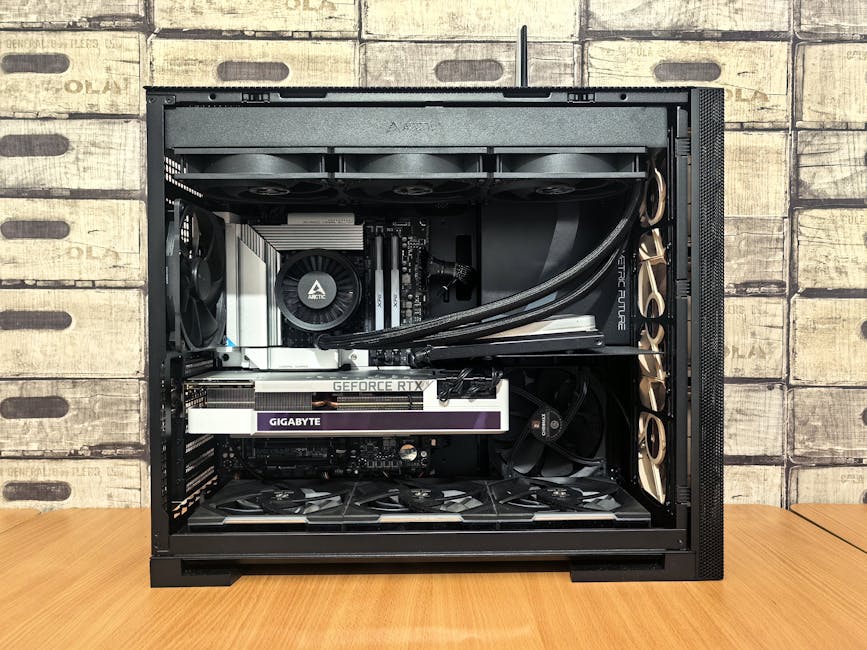
- DIY Home Server: Built from scratch — usually a mid or full tower case, an older workstation CPU (Xeon, Ryzen Threadripper), ECC RAM, and multiple drive bays. Powerful, expandable, but physically large and power-hungry.
- Mini PC as a Home Server: A hybrid approach that’s gained enormous traction — using a mini PC specifically as always-on server hardware. This is what we’ll spend most of our time analyzing.
The Numbers Don’t Lie: Power Consumption in 2026
With global electricity prices still elevated in 2026, power consumption isn’t a minor footnote — it’s often the deciding factor. Let’s look at realistic annual running costs:
- Beelink EQ12 (N100 chip, mini PC): ~8–12W idle → roughly $10–$15/year at $0.15/kWh
- MINISFORUM UM780 XTX (Ryzen 7 8745HS): ~18–25W idle → roughly $24–$33/year
- DIY server with Xeon E5 + 4 HDDs: ~80–150W idle → roughly $105–$200/year
- Full DIY NAS tower (TrueNAS Scale, 8 drives): ~120–200W → up to $260/year
That gap is significant. Over three years, a power-hungry DIY rig could cost you $600+ more in electricity alone — enough to buy another mini PC. The math really does favor compact hardware for light-to-moderate home server workloads.
Real-World Use Cases: What Do Most People Actually Need?
This is where I want to push back against the “more power = better” instinct. Let’s be honest about what most home server users are actually running:
- Plex or Jellyfin (media streaming for 1–3 users simultaneously)
- Pi-hole or AdGuard Home (network-level ad blocking)
- Home Assistant (smart home automation)
- Nextcloud or Seafile (personal cloud storage)
- VPN server (WireGuard or Tailscale)
- Light Docker container management
Here’s the thing — a $200 mini PC with an N100 or N305 processor handles all of the above simultaneously without breaking a sweat in 2026. The N100, in particular, has hardware transcoding that makes Plex buttery smooth for most use cases. You genuinely don’t need a Xeon for this.
Where DIY shines is when you need raw storage capacity (think 20–100TB+), heavy virtualization (running multiple VMs continuously), or serious compute workloads like local AI inference with a dedicated GPU. That’s a real use case — but it’s not most people’s use case.
Popular Builds and Examples from the Community in 2026
The self-hosting and homelab communities on Reddit (r/homelab, r/selfhosted) and the Asian tech forums (especially Korean communities on Clien and NAVER Café) have shifted noticeably toward mini PC solutions over the past two years. Here’s what’s working for real users:
- The “Budget Minimalist” Setup (Popular in Korea & Japan): Beelink EQ12 or GMKtec G3 Plus + external 4TB USB drive + Proxmox or Debian. Total cost: ~$180–$220. Runs Home Assistant, Pi-hole, and WireGuard. Zero noise, zero fuss.
- The “Enthusiast Hybrid” (Common in US & EU homelabbers): MINISFORUM MS-01 (with 2.5GbE + PCIe slot) paired with a separate Synology DS423+ for storage. The mini PC handles compute, the NAS handles bulk storage. Clean, modular, and surprisingly affordable.
- The Classic DIY Tower: Still popular among r/homelab veterans — usually a repurposed Dell PowerEdge R720 or a custom Fractal Define build. Fantastic for VM-heavy workloads or those learning enterprise infrastructure. Power bills are the main complaint in every single thread.
- The “Quiet Room” Constraint Build: Apartment dwellers in Seoul and Tokyo specifically gravitate toward fanless or near-silent mini PCs. The TRIGKEY G5 and Beelink GTi series are community favorites here precisely because they’re whisper-quiet at idle.
Where DIY Still Wins (And Wins Hard)
I don’t want to dismiss DIY builds — they absolutely have their place. Let’s be fair:
- Storage density: A DIY NAS tower with 8 drive bays running TrueNAS Scale can hold 160TB+ in a single chassis. No mini PC touches that.
- Repairability and upgradability: Standard ATX components mean you can swap RAM, CPU, and drives easily. Mini PCs often have soldered RAM and limited upgrade paths.
- Learning experience: If your goal is learning enterprise-grade skills (ZFS, iSCSI, VLAN configuration, KVM virtualization), a full DIY setup teaches you far more.
- Cost efficiency at scale: Buying used enterprise hardware (Xeon servers for $50–$150 on eBay) is still one of the cheapest ways to get serious compute power, even accounting for electricity.
- GPU passthrough: Running local LLM inference or Stable Diffusion locally? You need a real PCIe GPU slot. Most mini PCs can’t accommodate this (the MS-01 is a notable exception with its PCIe slot).
A Realistic Decision Framework
So how do you actually decide? Let me offer a simple framework rather than a blanket recommendation:
- Choose a Mini PC if: You live in an apartment, care about noise/power, want something running 24/7 with minimal maintenance, and your workload fits the “typical home server” profile above.
- Choose DIY if: You need serious storage (10TB+), run heavy virtualization or AI workloads, enjoy the tinkering process itself, or want to learn infrastructure skills hands-on.
- Consider the Hybrid approach if: You want the best of both — a low-power mini PC as the “brain” handling compute and services, paired with a separate NAS device for bulk storage. This is increasingly the community consensus in 2026.
Realistic Alternatives Worth Considering
If you’re on a tight budget or just starting out, don’t overlook these options:
- Raspberry Pi 5 (8GB): Still a legitimate entry point for Pi-hole, Home Assistant, and light Docker use. ~$80–$90 with a good case and power supply. Limited by USB storage speeds, but genuinely capable.
- Used Thin Clients: HP EliteDesk 800 G5 Mini or Dell OptiPlex Micro units can be found for $80–$120 used in 2026, often with 8GB RAM and an SSD included. Incredible value for a first home server.
- Cloud VPS Hybrid: For services requiring public internet access (like a personal Nextcloud), running a $5–$6/month VPS alongside a local mini PC often makes more sense than punching holes in your home router’s firewall.
The home server landscape in 2026 is genuinely exciting precisely because the barrier to entry has never been lower. A $150 mini PC today outperforms the $800 home server builds of five years ago — and sips power while doing it.
Whatever path you choose, the key insight is this: match the hardware to your actual workload, not your aspirational workload. Most of us don’t need a rack server. Most of us do need something reliable, quiet, and cheap to run. Mini PCs have quietly won that argument.
Editor’s Comment : Having tested four different mini PC home server setups over the past year — from a $120 used thin client to a $350 MINISFORUM box — the consistent surprise is how little hardware most home server tasks actually demand. Start small, measure your real usage, and only scale up when you have a specific, concrete reason to. Your electricity bill and your sanity will thank you.
📚 관련된 다른 글도 읽어 보세요
- Additive Manufacturing Meets Digital Twins: How Smart Factories Are Rewriting the Rules of Production in 2026
- 항공우주 부품 적층 제조(3D 프린팅) 적용 사례와 품질 검증 방법 완벽 정리 [2026년 최신]
- 3D 프린팅 소재 혁신 2026: 고강도 폴리머와 복합 재료가 바꾸는 제조업의 미래
태그: [‘mini PC home server’, ‘DIY home server 2026’, ‘homelab comparison’, ‘Beelink Proxmox setup’, ‘self-hosted server guide’, ‘mini PC vs NAS’, ‘home server power consumption’]
Leave a Reply