A few months back, a colleague of mine — a backend developer named Marcus — pinged me at 11 PM on a Tuesday. He was frustrated. He’d just gotten his first real paycheck raise and decided to finally build the homelab he’d been dreaming about for two years. Three days in, he had a pile of mismatched hardware, a Proxmox install that wouldn’t boot, and serious buyer’s remorse about a 10GbE switch he didn’t actually need yet. Sound familiar? I’ve been there. Twice. And I’ve helped about a dozen other people crawl out of that exact hole.
In 2026, building a homelab is simultaneously easier and more complicated than it’s ever been. The hardware options have exploded — especially with ARM-based mini servers now genuinely viable for production-like workloads — but so has the complexity of the software stack. This guide is the one I wish I’d had when I started, written from scar tissue and a lot of late-night debugging sessions.
Why Homelab in 2026? The Case Is Stronger Than Ever
Let’s be honest about the motivation. Cloud costs haven’t gotten kinder. As of early 2026, AWS EC2 on-demand pricing for a mid-tier m6i.xlarge instance sits around $0.192/hr — that’s roughly $1,680/year just to keep one instance running 24/7. A homelab equivalent running on a $400–600 mini PC consumes maybe 15–25W idle, which at the average US residential rate of ~$0.16/kWh translates to roughly $21–35/month in electricity. The math starts making a lot of sense, especially if you’re self-hosting multiple services.
Beyond cost, 2026 has given homelab builders something precious: legitimacy. Kubernetes at home is no longer a novelty — it’s practically a resume line item. The rise of AI inference workloads running locally (thanks to quantized LLMs and tools like Ollama and llama.cpp) has made GPU-equipped homelabs genuinely useful for personal productivity, not just tinkering.
Choosing Your Hardware Architecture: The Three Main Paths in 2026
When Marcus called me back, the first thing I asked him was: “What’s your primary workload?” That question determines everything. In 2026, there are three realistic homelab architectures most people fall into:
- The Mini PC Cluster (Best for most people): Machines like the Beelink EQR6, Intel NUC 14 Pro, or the newer ASUS NUC 14 Performance pack serious compute into a tiny, silent, power-efficient form factor. Running 2–4 of these as a Proxmox or K3s cluster gives you redundancy, realistic failover practice, and keeps your power bill sane. Budget: $300–700 per node.
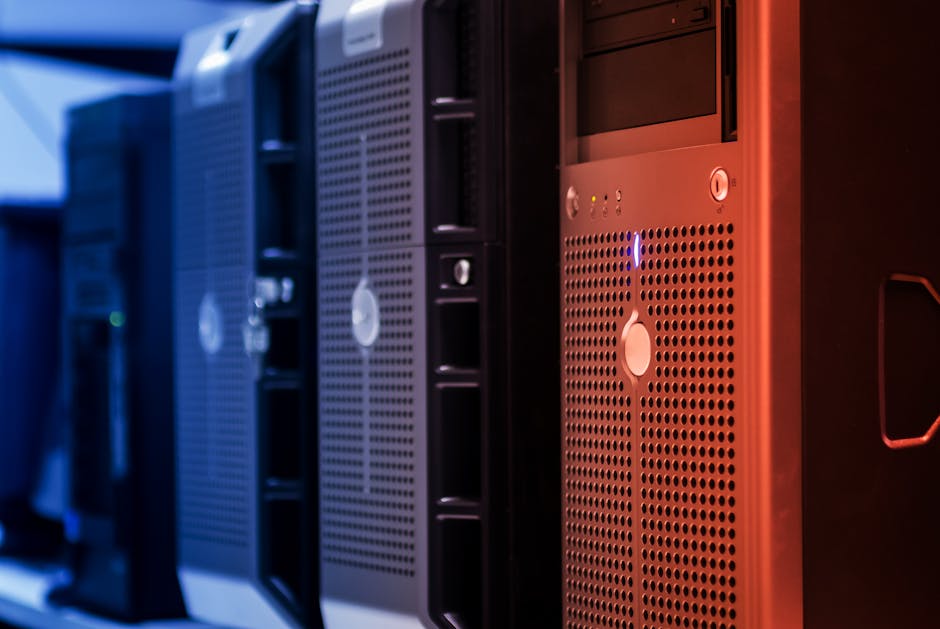
- The Repurposed Enterprise Server (Best for storage & raw compute): A used Dell PowerEdge R730 or HPE ProLiant DL380 Gen10 pulled from eBay for $200–400 gives you ECC RAM, hot-swap bays, and IPMI out-of-band management. The tradeoff? Noise (75dB+), power draw (200–400W under load), and you’ll need a dedicated room or garage. If you’re building a NAS-heavy setup with 10+ drives, this is your path.
- The ARM Homelab (The sleeper hit of 2026): Boards like the Raspberry Pi 5 (still going strong), the Orange Pi 5 Plus with its RK3588 SoC, or — if budget allows — the Ampere Altra-based Adlink COM-HPC modules offer exceptional performance-per-watt ratios. ARM64 support in Docker and Kubernetes has matured dramatically. Full ARM homelabs are now a serious choice, not a compromise.
Storage Strategy: Don’t Repeat My Mistake
Here’s a war story. In early 2024, I built my first real homelab with six 4TB WD Red drives in a ZFS RAIDZ2 pool. Solid in theory. But I used a cheap HBA card that didn’t properly report drive temperatures to the host OS. Fast forward four months: two drives failed within a week of each other — classic undetected heat-induced degradation. I lost zero data (RAIDZ2 saved me) but I lost two weekends rebuilding.
In 2026, my storage recommendations are:
For NAS builds: Use TrueNAS Scale (now on a stable Dragonfish-based release) with genuine LSI HBA cards (LSI 9300-8i or equivalent) flashed to IT mode. Don’t cheap out on the HBA.
For VM storage on mini PCs: NVMe SSDs are fast enough that you don’t need spinning rust for most workloads. A Samsung 990 Pro 2TB or WD Black SN850X handles Proxmox VM images beautifully.
For backup: Follow the 3-2-1 rule religiously. Local NAS + offsite replication to Backblaze B2 (still the best bang-for-buck in 2026 at $0.006/GB/month stored) + cold snapshots.
Networking: Where Most Beginners Overspend (And Underplan)
Marcus’s 10GbE switch mistake is incredibly common. Here’s the reality check: unless you’re regularly moving large files between homelab nodes — video production, VM live migrations across nodes constantly — 1GbE is completely fine. That said, planning for 10GbE is smart even if you don’t implement it immediately.
In 2026, the networking stack I recommend for most homelab builds:
- Router/Firewall: Protectli VP2420 running OPNsense or pfSense CE. Solid AES-NI support, fanless, sub-$300. Alternatively, a used Mikrotik hEX S for $60 if you’re comfortable with RouterOS.
- Managed Switch: Mikrotik CRS326-24G-2S+RM — 24 ports, 2x 10GbE SFP+ for node interconnect, under $200. Excellent value.
- VLANs from day one: Segment your IoT devices, your homelab management network, your trusted LAN, and a DMZ for anything internet-facing. Future-you will be grateful.
- Reverse Proxy: Nginx Proxy Manager or Caddy 2 for TLS termination. Let’s Encrypt certs automated with DNS challenge via Cloudflare API.
Software Stack: The 2026 Homelab OS Landscape
The virtualization layer debate has largely settled. Proxmox VE 8.x is the dominant choice for homelab hypervisors in 2026 — it’s free, open-source, has a polished web UI, supports both KVM VMs and LXC containers, and integrates Ceph if you want distributed storage. The community around it is enormous, which matters when you’re debugging at midnight.
For container orchestration on top: K3s (Rancher’s lightweight Kubernetes) has become the homelab standard for single-node and small-cluster Kubernetes. It runs comfortably on 2GB RAM and installs in under 60 seconds. For those who find full Kubernetes overwhelming, Podman + Quadlets has become a legitimately clean alternative to Docker Compose that integrates beautifully with systemd.
Key software references worth bookmarking:
- Proxmox VE: proxmox.com — Community scripts at tteck’s helper-scripts repo on GitHub are indispensable.
- TrueNAS Scale: truenas.com — Dragonfish release brought massive container improvements.
- HomeBridge / Home Assistant: homeassistant.io — If you’re doing any smart home integration (and you should be).
- Authentik: goauthentik.io — SSO/SAML/OAuth2 identity provider. Running this locally for all your homelab services feels genuinely premium.
- Uptime Kuma: GitHub (louislam/uptime-kuma) — Lightweight self-hosted monitoring with beautiful dashboards.
Power & Cooling: The Numbers You Actually Need
A three-node mini PC cluster running 24/7 with a small managed switch and a Pi-hole DNS server will draw roughly 40–70W total at idle. At $0.16/kWh, that’s under $100/year. Compare that to a single enterprise tower server doing the same job at 150–250W idle — nearly $300/year. The power math genuinely matters over a 3–5 year homelab lifecycle.
For cooling: mini PCs in an enclosed space is a silent killer. I run mine on a ventilated open shelf with a $15 USB desk fan pointed at them during summer months. Janky? Yes. Effective? Absolutely. If you’re running a rack setup, measure your room’s ambient temperature and leave at least 20–30% headroom in your rack cooling capacity.
Real-World Case Studies: How Others Are Building in 2026
The homelab community on Reddit’s r/homelab (now at 1.8M+ members) and the Self-Hosted Discord server have surfaced some fascinating 2026 builds worth studying:
Jeff Geerling’s ongoing ARM cluster work (jeffgeerling.com) has pushed ARM homelab viability into the mainstream conversation. His Raspberry Pi + CM4 cluster tutorials remain some of the best documented homelab content available.
Wolfgang’s Channel on YouTube has documented a fully self-hosted productivity stack — Nextcloud, Vaultwarden, Immich for photo management, and Jellyfin for media — running entirely on a three-node Beelink mini PC cluster with a total monthly power cost under $15. This is the realistic “I ditched Google/iCloud” homelab build that resonates with most people in 2026.
The ServeTheHome forum community (servethehome.com) remains the gold standard for enterprise hardware reviews and homelab power consumption benchmarks. Their quarterly power draw comparisons across mini PC generations are invaluable for purchase decisions.
Common Pitfalls (Learned From Personal Pain)
- Overbuilding Phase 1: Start with one node. Seriously. Understand the software before multiplying the hardware surface area.
- Skipping UPS: An APC Back-UPS 1500VA costs ~$150 and protects against data corruption on sudden power loss. Non-negotiable if you have a ZFS pool.
- No out-of-band management on mini PCs: This is the one real advantage enterprise hardware has. Workaround: a cheap Raspberry Pi Zero 2W running PiKVM can give you software-level remote access to a machine that won’t boot.
- Ignoring DNS from day one: Run Pi-hole or AdGuard Home locally from the start. Configure split-horizon DNS so your homelab services resolve correctly internally.
- Security as an afterthought: If you’re port-forwarding anything to the internet, use Cloudflare Tunnels or Tailscale instead. Both are free for personal use and eliminate the need to expose your home IP.
Marcus, by the way, ended up returning the 10GbE switch, consolidating to two Beelink EQ12 nodes running Proxmox with K3s on top, and spending the saved money on a proper UPS and a 4TB NVMe drive. Last I checked, he’s running Nextcloud, Vaultwarden, a personal Git server with Gitea, and Jellyfin — all on hardware that fits in a shoebox and costs him about $9/month in electricity.
That’s the homelab dream in 2026: not the most powerful thing possible, but the most useful thing — tailored to your actual needs, learnable in iterations, and genuinely yours.
Editor’s Comment : If the full build feels overwhelming right now, don’t let perfect be the enemy of good. Start with a single used mini PC, a fresh Proxmox install, and one Docker container running something you actually use daily — maybe Vaultwarden for passwords or Jellyfin for media. Get comfortable with that before adding nodes, VLANs, or Kubernetes. The homelab journey in 2026 is a marathon of pleasant discoveries, not a sprint to a finished product. Every debugging session teaches you something a YouTube tutorial never could.
📚 관련된 다른 글도 읽어 보세요
- Custom 3D-Printed Medical Implants in 2026: How Personalized Medicine Is Rewriting Surgery as We Know It
- 현직 엔지니어가 폭로하는 3D 프린팅 자동차 부품 생산 트렌드 2026: BMW·현대차가 조용히 바꾼 것들
- SLS vs SLA vs FDM: The Ultimate 2026 Guide to Industrial 3D Printing Technologies (With Real-World Tradeoffs)
태그: []
Leave a Reply